
About BIRD BACK
BIRD BACK is a fast, browser-based memory game where you fly through a 3×3 grid and recall positions or symbols from a few steps back. It’s inspired by the n-back task, but built to feel a little more like a traditional game than a brain training session. Fundamentally it is designed to train working memory capacity and accuracy. However, in contrast to traditional n-back, it has carefully been designed to emphasize engagement and reinforcement.
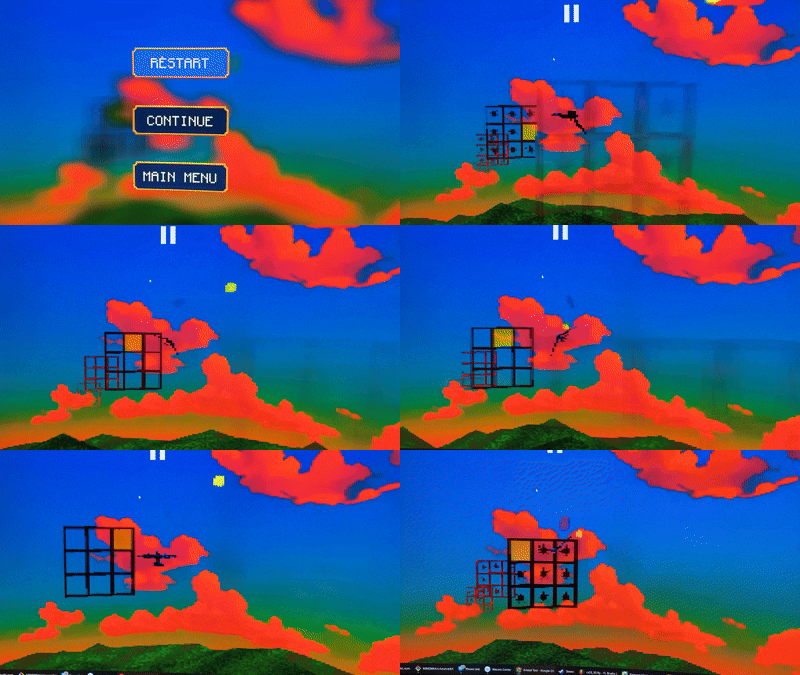
The project is built in WebGPU and can therefore run on several platforms and browser environments, but browser WebGPU support is necessary. It's currently in development since 2025 and is using a custom engine based on the WGPU framework (Rust).
Comparison to (Dual/Quad-) n-back
What is wrong with traditional n-back?
While N-back is considered the gold standard for measuring working memory (Owen et al., 2005), it is controversial as a brain training tool. The main point of contention is the debate on far-transfer and whether brain training actually yields any substantial benefit outside the task at hand (Jaeggi et al., 2010). We believe at least one reason behind this is a lack of positive reinforcement, and as a consequence, disengagement without flow.
Does this address the shortcomings of n-back?
The premise that Bird Back confers any advantage over traditional n-back, or is even replicating the same effects, remains scientifically unvalidated.
That being said, there are still some reasons to consider this approach. Please read the next section to understand why.
Given the lack of evidence I recommend you view this is a complementary approach as opposed to a true replacement of n-back. It may be particularly interesting if you struggle to sustain the motivation for traditional n-back tasks.
How is this different exactly?
Interactive 3D perspective
Bird Back is a 3D game with superficial similarities to games in the endless runner genre, e.g. Temple Run or Subway Surfers.
Immediate reinforcement
The game is "dopamine friendly" in the sense that it does not refrain from rewarding you when you get it right. Correct recalls trigger both immediate and intermittent rewards, which are intended to support motivation and help the brain strengthen working memory traces over time. In addition, the game has a score system and rewards you with a medal (Gold, Silver, Bronze) based on your performance.
We believe that since neuroplasticity is gated by activation of the reward system, the benefits of n-back may be held back by a lack of positive reinforcement.
Active item selection instead of noticing repetition
You actively select the recalled item among competing alternatives as opposed to pressing a button when you notice as repetition. We believe this is more engaging as well as demanding in terms of requiring precision of working memory encoding.
Single modality stream
There are several variations of the n-back task, e.g. single, dual, quad and even octa n-back, each referring to the number of simultaneous modality streams demanding attention. For example, with Dual-N-Back the player must remember both a visual position and an auditory letter for every step, effectively 2*N items in total.
While Bird Back supports at least two modalities (spatial and letters), you will only see one single modality at a time. Either you select a fixed modality (Spatial or Letters), or let it be randomized (Combined mode).
We acknowledge that this may be viewed as a limitation, but also consider the previous point. Active selection can be more demanding than noticing repetition, so this "limitation" may frankly be seen as a balancing strategy.
In addition, research suggests that 'leveling up' to multiple modalities offers no significant advantage over a single-modality n-back (Thompson et al., 2013). Increasing the complexity of the task seems to make it more exhausting, but not necessarily more effective.
What are the benefits of playing this?
While unsubstantiated for the specific format of Bird Back, it may by virtue of similar gameplay mechanics share the benefits of traditional n-back:
- Increased working memory capacity: Recent meta-analyses (including those from 2024 and 2025) consistently show that n-back training reliably improves performance on untrained working memory tasks, which is the definition of increasing capacity (Psychiatrist.com, 2024; Soveri et al., 2017; Frontiers in Human Neuroscience, 2025).
- Strengthened executive control: n-back training has been shown to strengthen a comprehensive suite of executive control functions, specifically inhibitory control, interference resolution, task-set shifting, the dynamic updating of mental representations, and the filtering of irrelevant stimuli (Hidalgo-Lopez et al., 2025; Miyake & Friedman, 2012).
- Easier passive memory retention: training has been found to improve passive memory retention, likely due to the strengthening of the underlying phonological and visuospatial storage buffers (Westerberg et al., 2007). Research indicates that taxing the executive 'updating' process can lead to increased capacity in simple maintenance tasks, such as digit or letter spans, which are traditionally categorized as passive storage (Soveri et al., 2017)
In other words, while far-transfer remains a point of contention, there is strong evidence that N-back training fulfills its original design (Kirchner, 1958) by expanding general working memory capacity. Meta-analytic data confirms that training leads to robust 'near-transfer,' enabling individuals to manage larger loads of information in other, untrained cognitive tasks (Soveri et al., 2017)
While some research suggests that N-back training can drive gains in fluid intelligence (Jaeggi et al., 2008), these findings have proven notoriously difficult to replicate (Redick et al., 2013). The association remains inconsistent, particularly when contrasted with the more robust improvements seen in standardized working memory measures, such as the WAIS-IV Working Memory Index (WMI) (Soveri et al., 2017).
This suggests that while training effectively expands the capacity of the 'mental workspace,' this expansion does not always translate into the higher-order reasoning required for fluid IQ (Shipstead et al., 2012).
How to play
The idea is simple: each grid shows a token or highlighted position which the bird will automatically fly through. Your job is to remember it, and steer the bird towards the corresponding lane N grids later. The middle lane is never viable as an answer candidate, so you will need to move the bird using the controls.
Note that TOKEN and SPATIAL modes expect different types of answers:
- TOKEN: We want you to select the token you saw before. The actual lane in which it is presented is irrelevant
- SPATIAL: You will only see empty lanes. We want you to select the same lane which the bird went through before.
Controls
- Keyboard: You steer the bird with the arrow keys (UP, DOWN, LEFT and RIGHT).
- Touch: Tap and hold the touch screen, the bird will automatically center to the middle lane. Then you may swipe in any direction to one of the 8 surrounding grid holes
The bird is automatically centered to the middle lane when it is time to answer, regardless of control-type.
Campaign Mode
This game mode is not yet ready. Please return later for this feature,
Custom Mode
In this game mode you manually select the game parameters. It is recommended to set SPAN = Interleaved for strict working memory training, and SPAN = ONCE/REPEATED for regular short term memory training.
N-LEVEL
This number determines how many steps back you need to consider. n-1 = the number of items between the display and answer.
For each answer:
- N=1: There is no item between the display and answer. You recall the item you just saw immediately before.
- N=3: There are exactly 2 items between the display and answer.
MODALITY
- TOKEN: recall a number or letter shown, which can be shown anywhere in the grid.
- SPATIAL: recall the highlighted position in the grid.
- RANDOMIZED: Sometimes TOKEN, sometimes SPATIAL
SPAN
- Once: recall the same N items shown initially
- Repeated [X]: recall the same N items shown initially X+1 times
- Interleaved [hints=Y/N]: recall the item N steps back repeatedly while having some older items be overwritten by a new one. With hints=Y, you see a index label each grid indicating which item we are after.
DIRECTION
- FORWARD: you recall the previously presented items in the same order they were shown
- BACKWARD: you recall the previously presented items in reverse order
DISPLAY SPEED
The speed at which the player will move forward when they are about to learn a new item. Used either, if the next grid is of the display-type as opposed to the answer-type, or if the player has already answered.
ANSWER SPEED
The speed at which the player will move forward when they are about to recall a previously seen item. Used when the player has not yet decided upon an item, but is expected to.
LURES
The number of viable alternate representations (tokens or spatial positions) which may distract from the correct answer.
- 1 LURE: You choose between two items and have 50% chance of getting each item right.
- 3 LURE: You choose between four items and have 25% chance of getting each item right.
- 7 LURE: You choose between 8 items and have 12.5% chance of getting each item right.
TOKEN (if modality is TOKEN or RANDOMIZED)
- NUMBER: A one- or two-digit number between 0-99 (e.g. 7 or 34)
- ONE DIGIT (0-9): A one-digit number between 0-9 (e.g. 7)
- TWO DIGITS (10-99): A two-digit number between 10-99 (e.g. 34)
- ALPHABET: An alphabetical character (A-Z).
- RANDOMIZED: Any of the above.
Troubleshooting
"WebGPU must be enabled in browser to play"
You need to enable WebGPU with a a browser setting:
- Firefox: Go to "about:config" and set "dom.webgpu.enabled"=true.
- Chrome: Go to "chrome://flags" and enable the "WebGPU Developer Features" flag
If this issue persists after changing the configuration, WebGPU may not be supported by your browser. Please reattempt after updating it or with another browser. Current browser compatibility status can be seen here.
Poor performance
This appears to mainly affect Linux environments as of April 2026. Ensure you keep your browser up-to-date because there is ongoing development to improve browser implementations. As this project is an early adoption of the WebGPU standard, support and performance may vary across browser implementations. We recommend Chrome or Edge on Windows and Android for optimal frame rate.
Feedback
Bird Back is a personal project, so if you have feedback or questions we would love to hear from you on the contact page. We are particularly interested in anecdotes in which you or someone you know has noticed benefits in daily life. Conversely, if your training regime has been not effective, such feedback would also be of interest - ideally containg some reasons why you think it didn't work.
Attributions
We would like to credit the creators of resources used for this project:
- Jingle_Achievement_00.wav by LittleRobotSoundFactory -- https://freesound.org/s/270404/ -- License: Attribution 4.0
- punch.wav by Ekokubza123 -- https://freesound.org/s/104183/ -- License: Creative Commons 0 punches_and_slaps.wav by Syna-Max -- https://freesound.org/s/43586/ -- License: Attribution NonCommercial 4.0
- Retro Coin Collect by DrMinky -- https://freesound.org/s/166184/ -- License: Attribution 4.0
- Powerup/success.wav by GabrielAraujo -- https://freesound.org/s/242501/ -- License: Creative Commons 0
- Retro You Lose SFX by suntemple -- https://freesound.org/s/253174/ -- License: Creative Commons 0
- upward beep chromatic fifths.wav by Mossy4 -- https://freesound.org/s/263655/ -- License: Attribution 4.0
- Jingle_Achievement_00.wav by LittleRobotSoundFactory -- https://freesound.org/s/270404/ -- License: Attribution 4.0
- Score 1 by CJspellsfish -- https://freesound.org/s/676401/ -- License: Creative Commons 0
- ui-mistake.wav by StavSounds -- https://freesound.org/s/701703/ -- License: Creative Commons 0
- Race Start by JustInvoke -- https://freesound.org/s/446142/ -- License: Attribution 4.0